Free and open source · AGPL-3.0

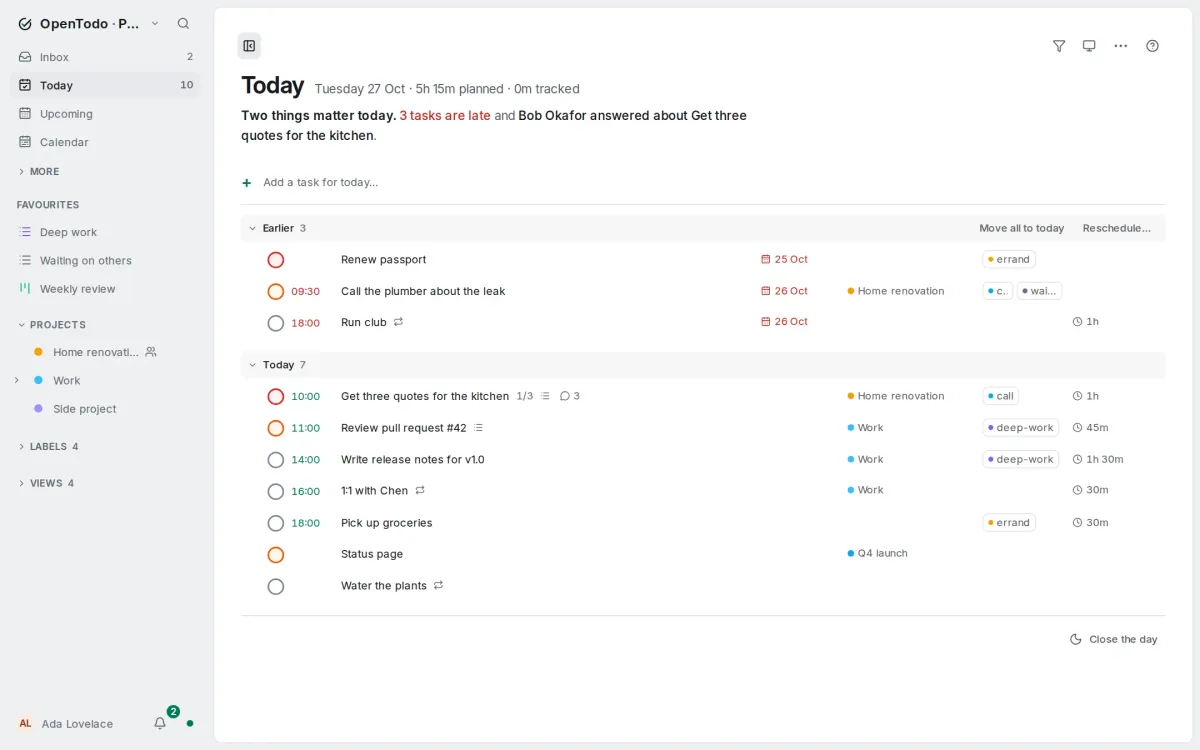
Three things matter today. Two tasks are late, Monday is already full, and Mia answered your question about the trip.

That's how Today starts in OpenTodo: one sentence on what stands out, worked out on your device.

OpenTodo is a calm task list that runs on your own server. Plan your day, keep projects in order and share lists with the people you live and work with.

Try the demo Get startedNo account, nothing to install.
OpenTodo's Today: the sentence about the day under the title, then the tasks in one line each with their dates, projects and labels in aligned columns.

01

Your day, your projects, one quiet screen.

  • Today says what matters

    One sentence under the date names what is late, what is full and who replied, and each part opens what it names. Your device works it out, offline, with no AI.

    Today, Upcoming
  • Type it the way you say it

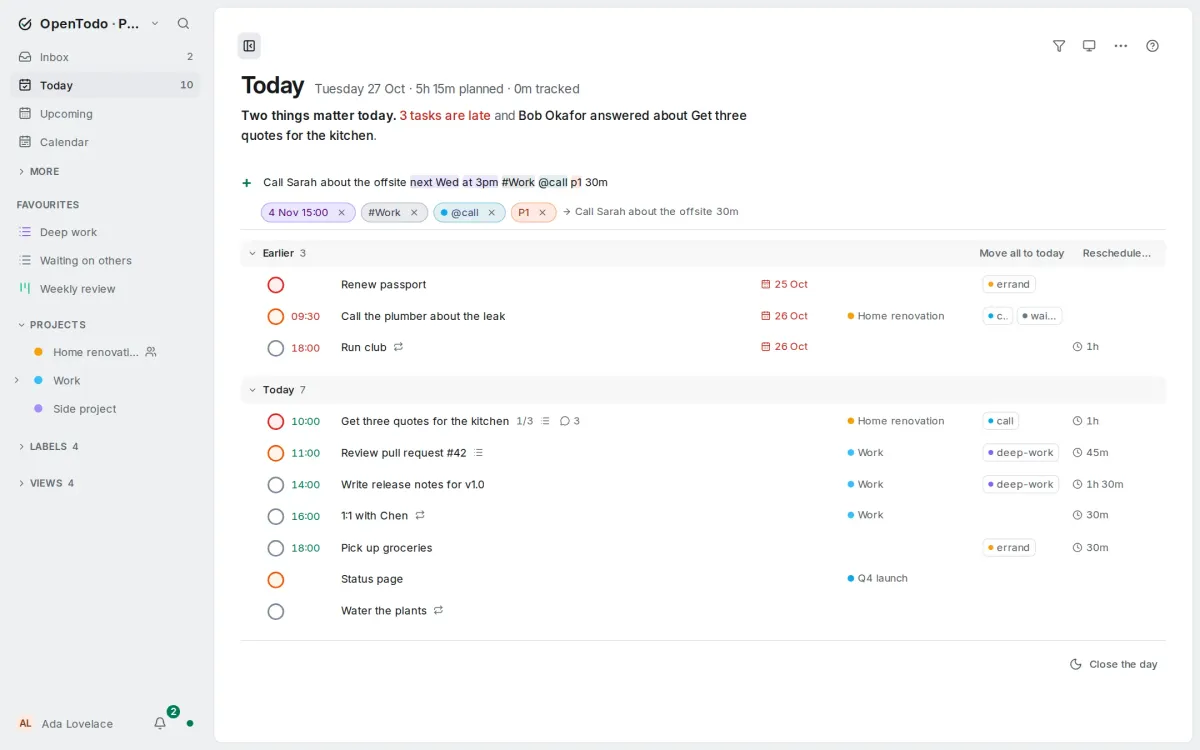
    “Book the plumber friday 10am #Home p1” becomes a task with its date, project and priority, in six languages.

    Everywhere
  • Projects as a list, a board or a timeline

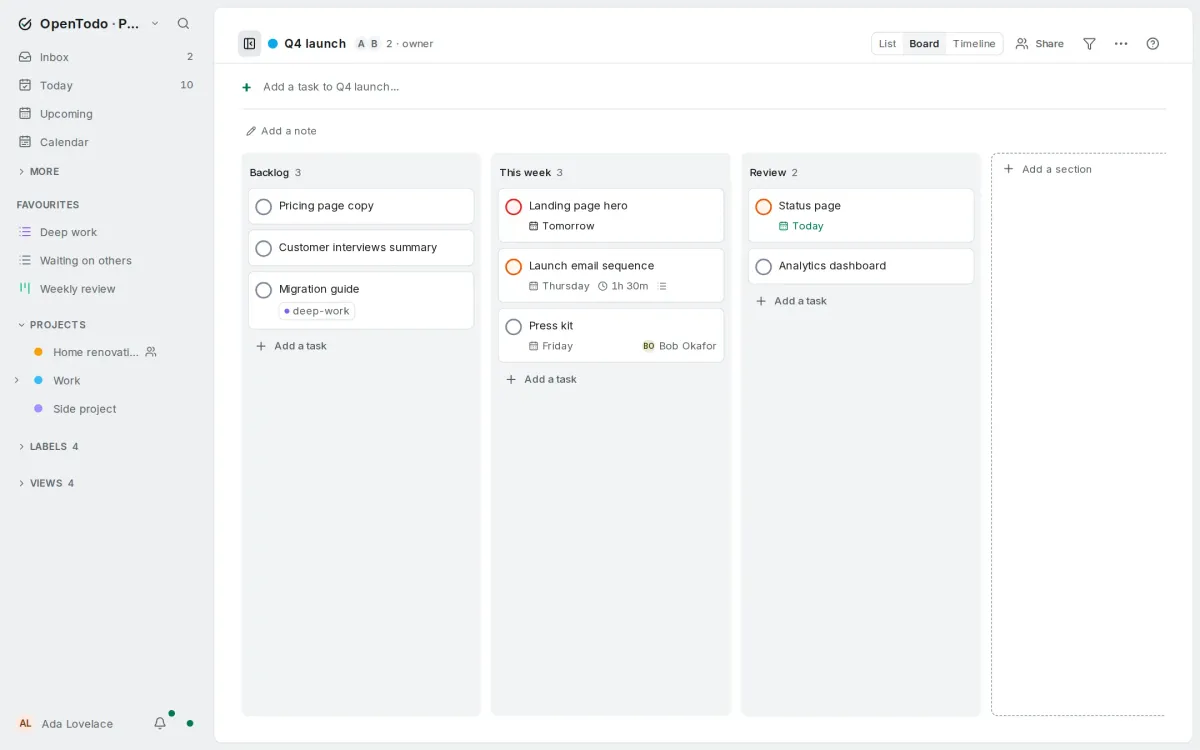
    Sections, deadlines and progress at a glance. Share a project and assign its tasks to the people in it.

    Projects
Quick add listing the date, project, label and priority it understood in a typed line.
Quick add shows what it understood.
A shared project as a board with Backlog, This week and Review columns.
A shared project as a board.

02

Everything included.

54 features in 6 groups, and the integrations you already use. Nothing is held back for a paid plan.

No tiers Every feature, for everyone. All features, with their docs

Connects to
CalDAV · iCal feeds · GitHub issues · GitLab issues · Email to task · Webhooks · ntfy · Pushover · Gotify · Home Assistant · MCP · Claude Code · Browser extension · Android · ot command line · Obsidian vault
Imports from
Todoist · Things · TickTick · Linear · Asana · Trello · Microsoft To Do · Google Tasks · Apple Reminders · Any.do · CSV · JSON

03

Yours, for good.

No OpenTodo account and no OpenTodo cloud. One server for everyone you share lists with, and you can leave with everything whenever you like.

  • Free, all of it

    No tiers, no seats, no trial: every feature for everyone on your server, the whole household included.

    What it costs: Free, all of it
  • On your server

    One container and one folder of data. A Raspberry Pi or the smallest rented server is enough.

    Self-hosting: On your server
  • Works offline

    Every device keeps a full copy. Edit on the train; changes merge field by field when you are back.

    Offline and sync: Works offline
  • Encrypted if you want

    With end-to-end encryption, task text is encrypted on your devices before it reaches the server.

    Encryption: Encrypted if you want
  • AI on your terms

    Off unless you turn it on. Your model, local ones too; the assistant proposes changes you approve, and every change can be undone. Your own AI tools connect through MCP or the Claude Code plugin under an agent token.

    How it works: AI on your terms

04

Three ways in.

OpenTodo is not offered as a hosted service, so there is nothing to sign up for here. Move between the three later; your data comes with you.

  1. Try the demo

    A private sandbox in your browser with sample projects, deleted after two hours without activity.

    Open the demo How the demo works
  2. Join a server

    Someone runs it for your home or team? Open the invitation link they sent, then install the app from the browser.

    Install the app Installing the app
  3. Run your own

    Docker, Umbrel, Unraid, TrueNAS, a Pi or a VPS, in about twenty minutes the first time.

    Self-host Plan your server

Moving from Todoist, Things, TickTick or Linear? Bring your tasks

Community

Come and say hello.

OpenTodo is made in the open, and the people who use it shape what comes next. Join us on Discord: ask a question, show how you organise your days, or tell us what you wish it did. Questions are answered by people who run it and by the maintainer.