
Some jobs are never done for good. The bins go out every Tuesday, the plants want water every few days, the rent leaves on the 1st, and the kettle needs descaling whenever you remember it. A household list of these is easy to write and hard to keep: either it fills up with copies of the same chore, or it is empty the week you need it. This post sets the list up once, so it stays the right size by itself.
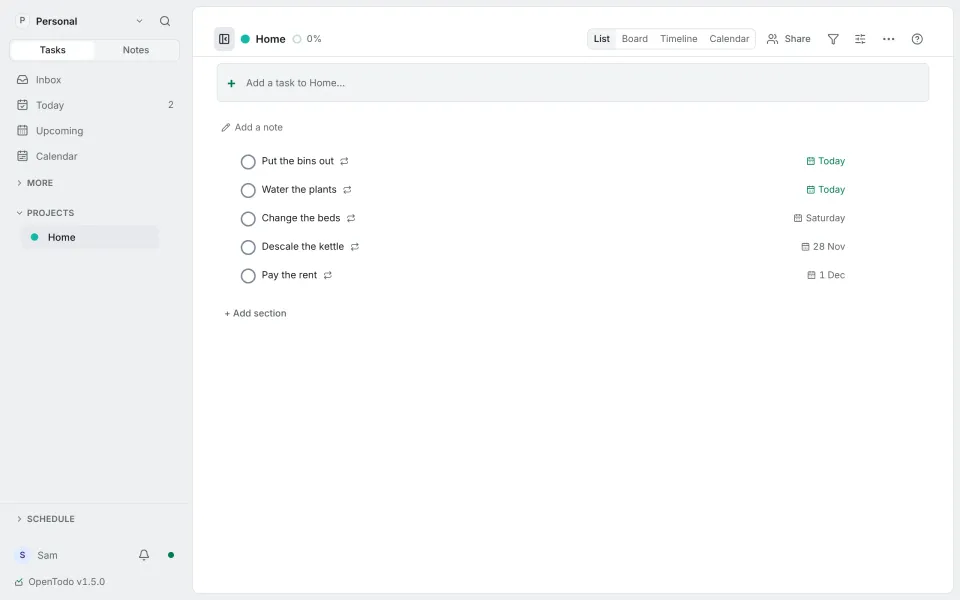
The list in the pictures is an example I made for this post, on OpenTodo 1.5.
Write each chore once, with its rule
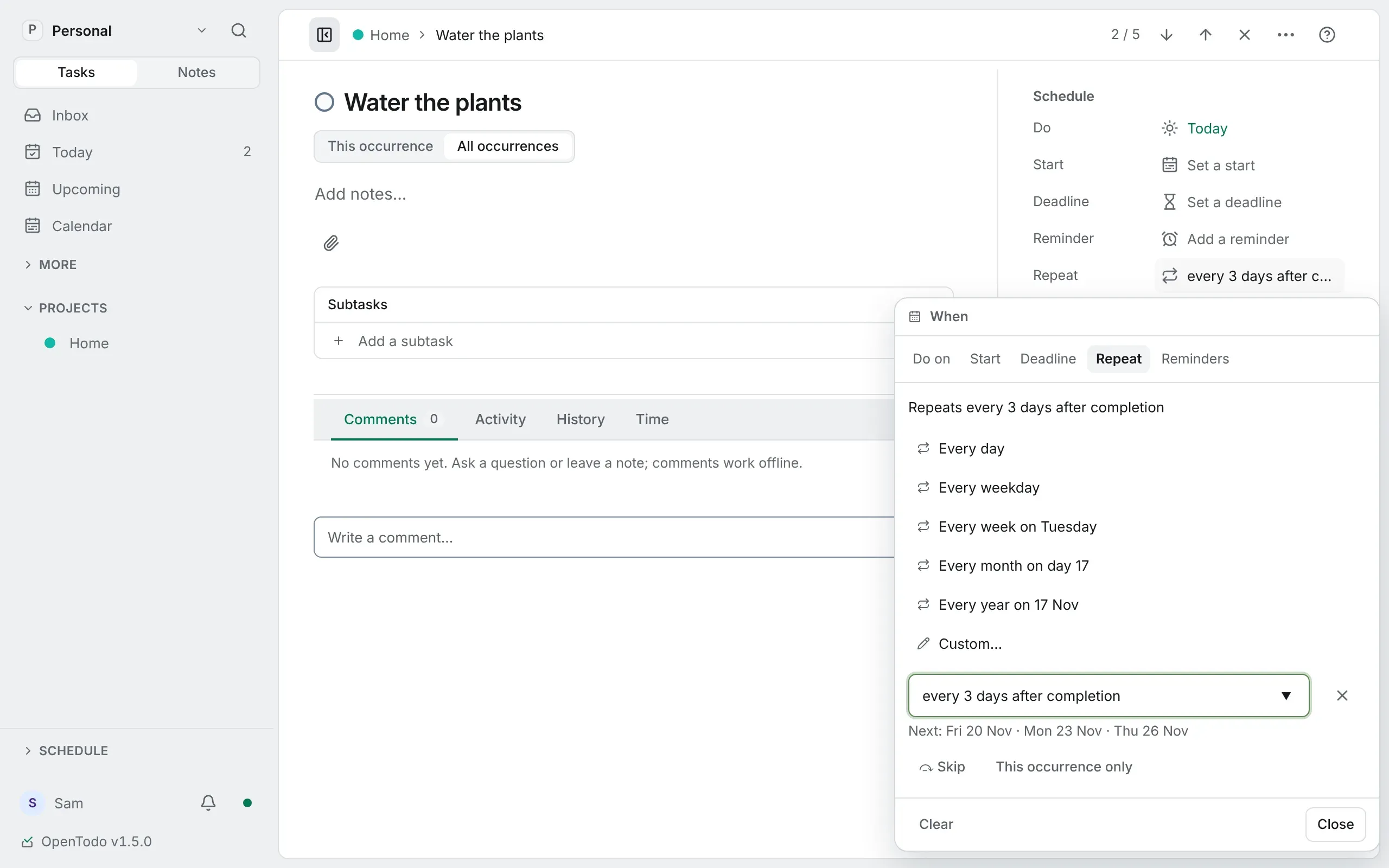
Give a chore its date, then choose Repeat and a rule. The menu offers the common ones, named from the task’s date (Every week on Tuesday, Every month on day 22), and Custom… takes any rule you type, with the next three dates under it so you can check it means what you think. Repeating tasks show a ↻ on the row. Make a task repeat
The example list uses five rules:
| Chore | Rule |
|---|---|
| Put the bins out | every tuesday |
| Water the plants | every 3 days after completion |
| Change the beds | every 2 weeks on saturday |
| Descale the kettle | every 2 months after completion |
| Pay the rent | every 1st |
The full list of rules, from every weekday to every last friday, is in Repeat rules.
You can also type the rule straight into quick add: Clean the bathroom every saturday creates the chore with its rule and its first date. Make a task repeat
Tick it, and it moves on
When you complete a repeating task, that occurrence is recorded in Completed and the task moves to its next date. The bins, ticked on a Tuesday, come back the next Tuesday. Complete, skip or split off one occurrence
If a chore was overdue, it jumps to the next date from today, so the weeks you missed don’t pile up as a queue of old copies. Forget the bins for a fortnight and there is still one task, on the next Tuesday. Complete, skip or split off one occurrence
Some chores count from when you did them
The bins follow the calendar: the lorry comes on Tuesday whether you were early or late. The plants don’t. If you water them on Thursday instead of Wednesday, the next watering should be three days after Thursday.
That is what after completion is for: the next date counts from the day you actually finish, not from the due date. The kettle works the same way, every two months after the last time you did it. Repeat rules
When a week is different
Two buttons under the rule handle the exceptions. Complete, skip or split off one occurrence
- Skip (Shift + S) moves to the next date without recording a completion. You’re away, so the plants are someone else’s this week.
- This occurrence only (Shift + O) splits this week off as a normal task you can change freely, while the series moves on. The bins go out on Wednesday because of a bank holiday.
For the rent, a rule on the 1st and a reminder the day before is a good pair. Tips
Sharing the list
If you share the Home project with the person you live with as an editor, you both see the same chores and either of you can tick them. Choose a role Reminders stay personal: yours go to you, theirs go to them. Shared projects
Good to know
- Changing the title, notes, project, priority, labels or time of a repeating task changes the whole series. To change one week only, split it off first. Complete, skip or split off one occurrence
- Rules are stored in English, whichever language you typed them in. Rules you can write
- A streak only makes sense for a rule on the calendar, so habits use rules like
every day, notafter completion. Track a habit
That is the whole set-up: five lines, written once. Next in the series is another way of working, shown the same way in the real app.
If this helped, you can buy me a coffee or sponsor OpenTodo on GitHub. It keeps the project free and without ads.