
Invite people to your server
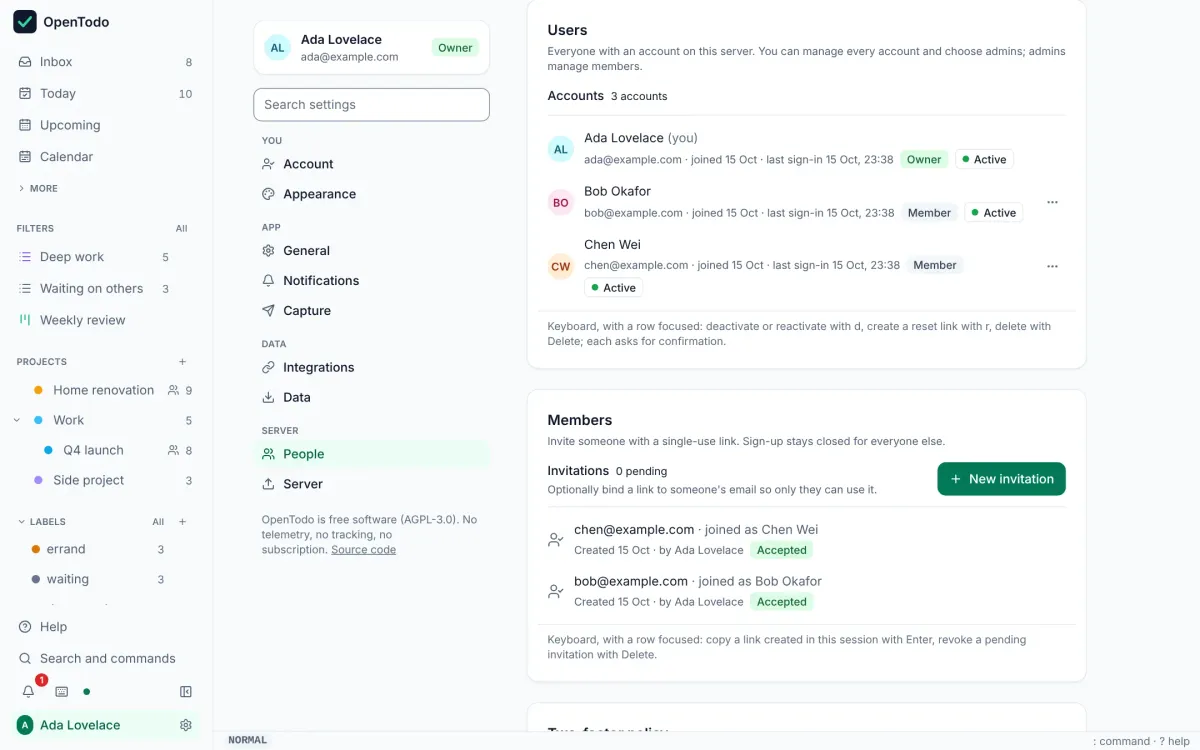
Sign-up is closed after the owner account. You bring people in with single-use invitation links, one each, sent however you like.
About 2 minutes · For the person who runs the server · Last reviewed
What you need
- To be the owner or an admin of the server. Invite someone new
Steps
- Open Settings → Administration → Members. Invite someone new
- Optionally enter the person’s email, choose how long the link stays valid, and select Create invitation. Invite someone new
- Copy the link and send it to them yourself, by message or email. OpenTodo sends no emails. The link works once. Invite someone new
- They open it, choose a name and a password, and have their own account with their own private tasks. Share projects with them afterwards. Share a project
Good to know
- Keep sign-up closed. Opening it to anyone who can reach the server is rarely what you want on a public address. Docker Compose
- A project invite link can create the account and share the project in one step, when you create it as owner or admin, or when you allow members to do so in Settings → Access policies. Who can bring new people
- Forgotten passwords come back to you: the owner creates a single-use reset link for the person in Settings → Administration → Users and sends it; nothing is emailed. Managing users