
Share a project with your partner or your team
Everyone sees the same tasks, edits reach everyone within seconds, and each task has a comment thread. Pick a role per person.
About 2 minutes · For everyone who uses the app · Last reviewed
What you need
- The other person’s account on the same server. If they have none yet, use an invite link instead; it creates the account and shares the project in one go. Share a project
Steps
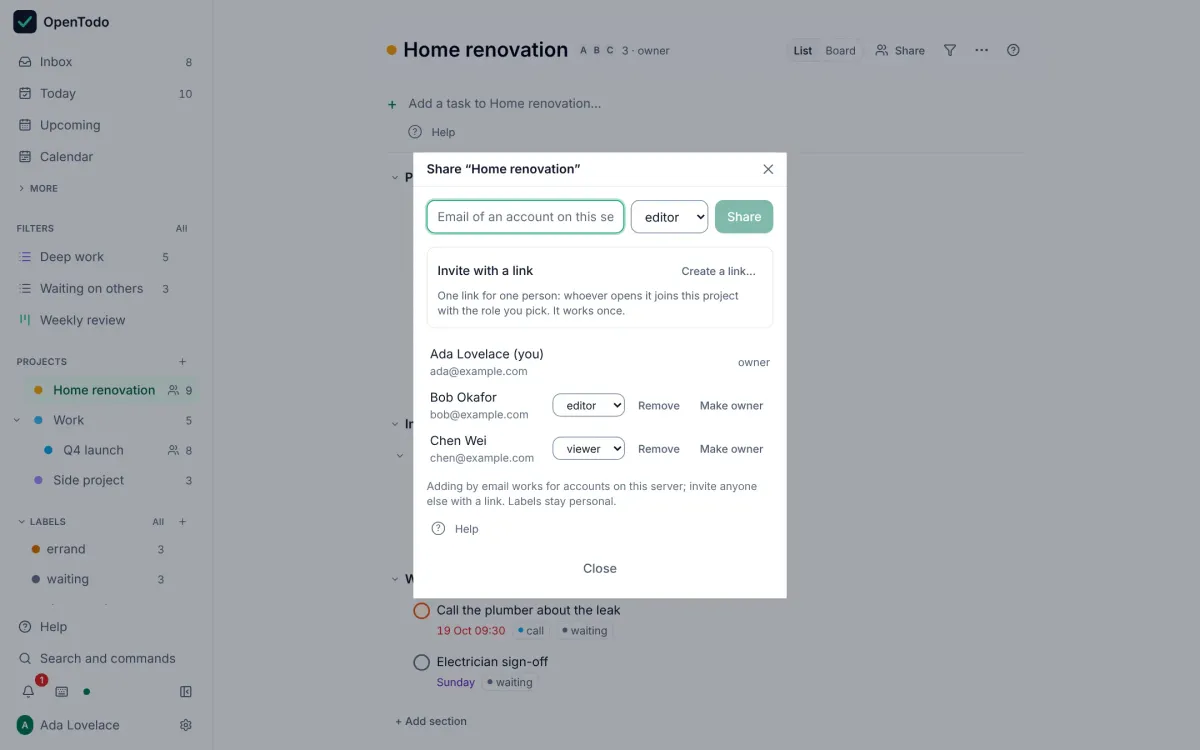
- Open the project and select Share at the top, or press Shift+S. Share a project
- Type the person’s email address. Share a project
- Pick a role: viewer (see and comment), editor (also add, edit, complete, delete and assign), or admin (also rename, archive and manage members). Select Share. Choose a role
- The project appears on their devices on their next sync, with all its tasks, and a small people icon marks it in the sidebar. Share a project
Then
- Assign a task: open it and choose someone under Assignee, or select it and press Shift+A. They get a notification, and Assigned to me in the sidebar lists everything assigned to them. Assign tasks
- Comment on a task from the Comments tab; mention someone with
@and they are notified. Comments work offline and are sent later. Comment on a task - See what others changed in Activity in the sidebar, filtered by project, person or kind of change. See what others changed
Good to know
- Labels and reminders stay personal, even on shared tasks. Things to know
- An account with end-to-end encryption turned on cannot share new projects; shared projects are never encrypted. Things to know
If it does not work
- “No account with that email”: only people with an account on your server can be added by email. Send an invite link, or ask an admin of the server to invite them. I can’t share a project with someone