
Meal planning
A weekly rhythm for choosing meals, writing the shopping list and prepping ahead.
- List
- For households
- Habits
- Teamwork
About this template
Planning meals once a week saves both money and evenings. This template sets a Sunday rhythm with repeating tasks: choose, write the list, shop, prep.
Keep the shopping list in the same shared project so whoever is in the shop sees it live.
How to use it
- Import the file; the Sunday rhythm repeats every week: choose, write the list, shop, prep.
- Share the project so whoever is in the shop sees the list live.
- Add this week's groceries as subtasks of the shopping task and tick them off in the aisle.
Make it yours
- Move the planning day to whenever your week starts.
- Add a section per weekday with the dish as the task title, so the plan is visible on the phone.
- Keep a "Staples" section of things you always need and copy from it.
Import it in three steps
- Download the template file.
- In OpenTodo, open Settings, then Data, then Import data.
- Choose the file, check the preview, and select Import.
What is inside
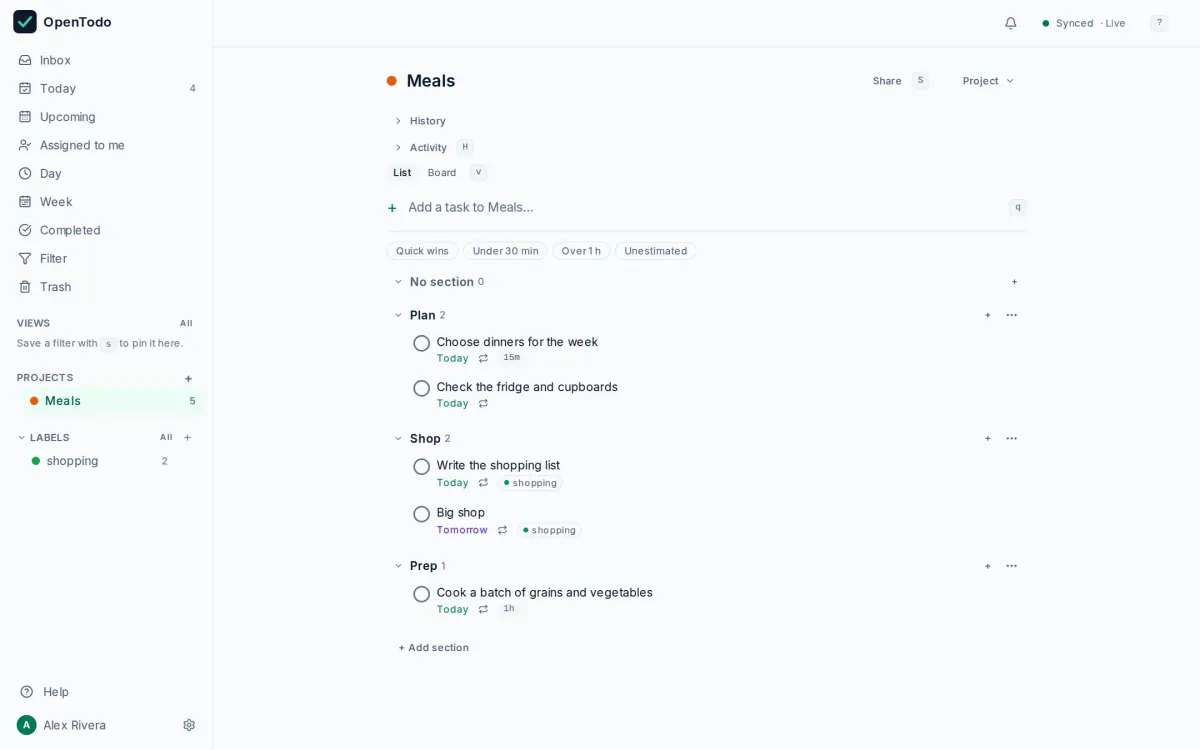
Every project, section and task the file creates, as the import will show them. Dates are relative to the day you import.
- MealsPlan
- Choose dinners for the week
- Check the fridge and cupboards
Shop- Write the shopping list
- Big shop
Prep- Cook a batch of grains and vegetables
Similar templates
Home maintenance
The yearly and seasonal jobs every home needs, repeating so you never have to remember them.
- List
- For households
Household chores
Daily, weekly and monthly chores on repeat, ready to share and assign in a household.
- List
- For households
Moving house
Everything from notice periods to the last box, in sections you can share with everyone who is moving.
- Board
- For households
Your to-do list, on your own server.
Try the demo in your browser. When you like it, install OpenTodo on your server and import your tasks.