
Add a task with its date, project and label in one line
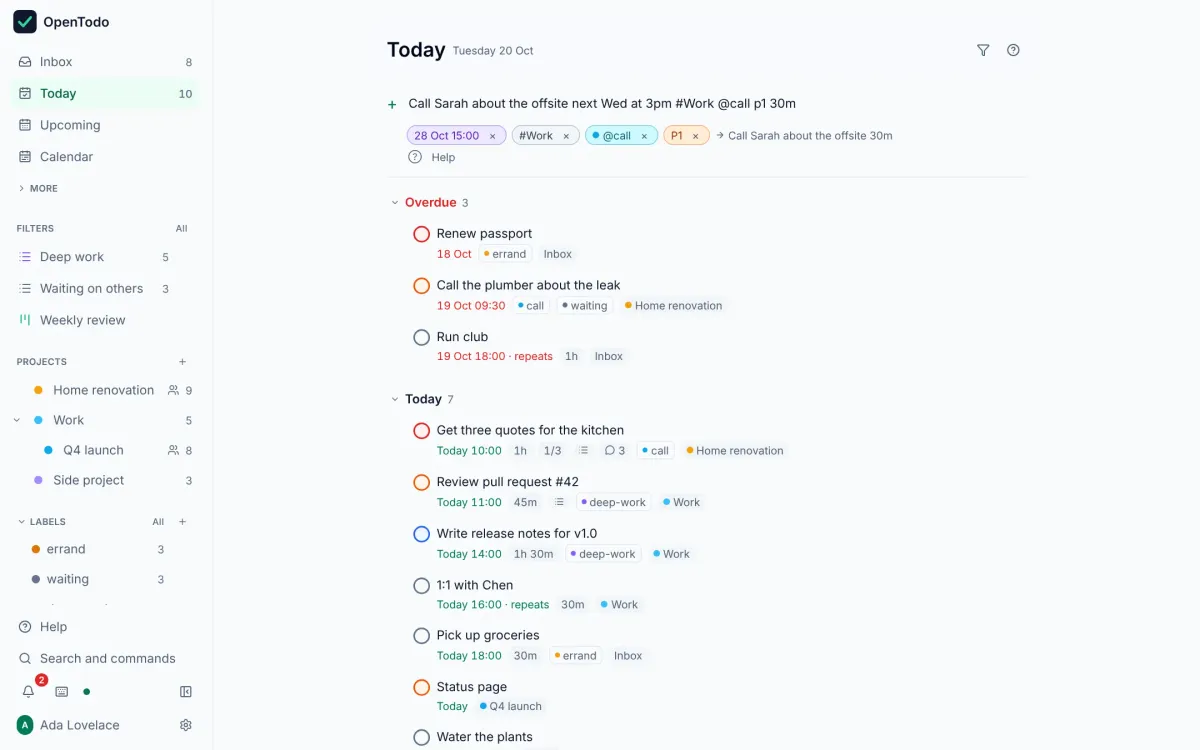
Type "Call Sam tomorrow 3pm #Work @call p2 +30m" and OpenTodo fills in everything. In six languages.
About 2 minutes · For everyone who uses the app · Last reviewed
What you need
- Nothing. This works in every task list, on the phone too.
Steps
- Press q in any list, or click Add a task. Add a task
- Type the task, then the details in any order. A date in everyday words (
tomorrow,next wed,3 Feb), a time (at 3pm,15:00),#project,@label, a priorityp1top4, and an estimate like+30m. Tokens - Watch the chips under the box: each one shows what was understood, and the title preview shows what will be saved. A word taken by mistake (“may” the name, not the month)? Select the × on its chip, or press Backspace twice at the end of the line. Preview chips
- Press Enter. The task is created with everything set, and the box stays open for the next one. Quick add syntax
Good to know
- Dates work in English, German, French, Italian, Spanish and Portuguese, all at once:
demain à 15handmorgen um 15 Uhrboth work. Languages - Text in double quotes is never interpreted:
Read "Next Friday" tomorrow. Preview chips - Where you are matters: a task typed in Today is due today, one typed in a project goes into that project, unless the line says otherwise. Views and defaults
- Repeat rules are not read here. Add the task, then open it and set Repeat. Make a task repeat
If it does not work
- A word is read as a date, project or priority every time: turn parsing off for this device in Settings → Capture → Quick add. Quick add got it wrong
- A
#projectstays in the title: no project matches that name or prefix, or two do. Type more of the name; the chip shows the path when it matches. Tokens