
Plan your day with Today and the calendar
Deal with what is overdue, give the big things a time slot, and see whether the day actually fits before it starts.
About 5 minutes · For everyone who uses the app · Last reviewed
What you need
- Five minutes in the morning.
Steps
- Open Today (g then t). Overdue tasks sit in their own red group at the top. For each one: do it now, give it a new date, or drop it. Plan your day with Today
- Give the tasks that matter an estimate: select one, press e, type
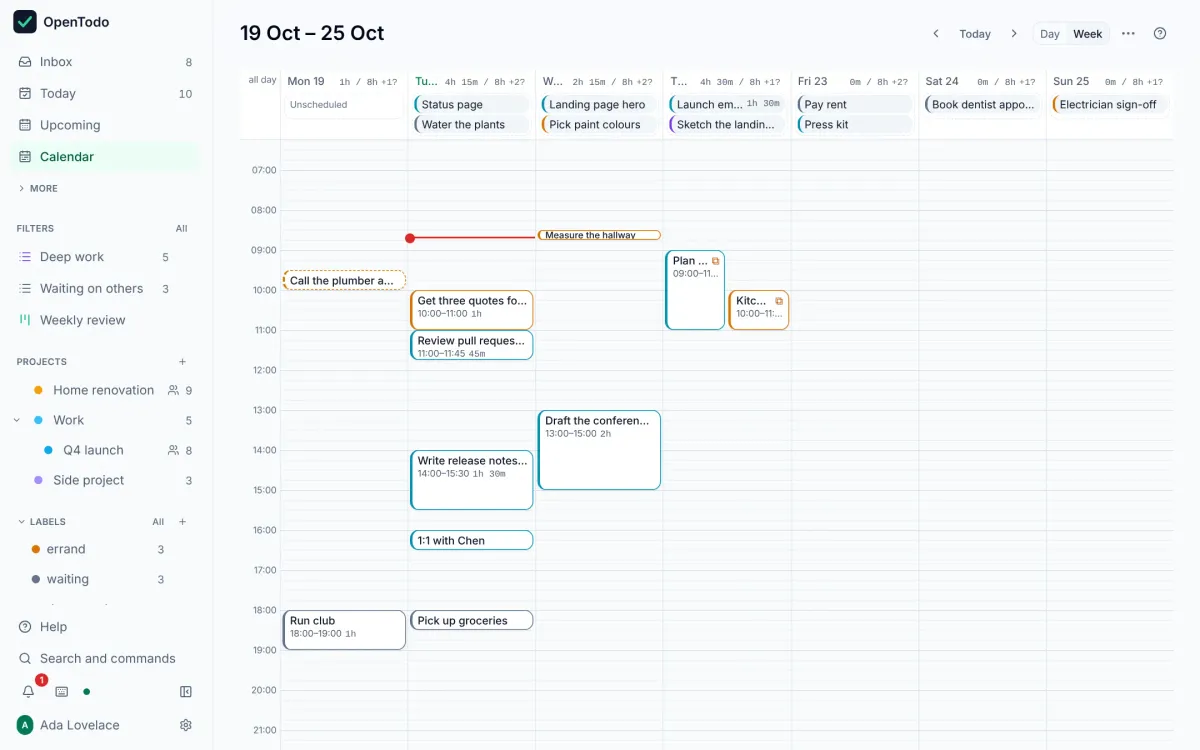
20,45mor1h30. The estimate shows on the row. Estimate how long a task takes - Select a task and press s: the Day calendar opens with the task ready to place. Move it with the arrow keys and press Enter. Or drag tasks from the Unscheduled lane onto a time slot with the mouse. Place a task on the calendar
- Read the day’s header: it adds up your estimates against your day length, for example
4h 15m / 8h, and marks the day when you have planned more than it holds. Move something if it does. See whether the day fits - Short gap between meetings? Turn on Quick wins above a list to see only tasks of 15 minutes or less. Narrow a list by duration
Good to know
- Times you set on the calendar are ordinary due dates, so they show in Today and Upcoming as well, and in calendar apps connected over CalDAV. Tips
- The grid’s start, end and your day length are set per device in Settings → Preferences → Calendar. Adjust the grid
- For the week, open Upcoming or Week (g then w). Plan your week with Upcoming