
Save a filter as a view in the sidebar
Ask "every call I need to make this week", then pin the answer to the sidebar with a live count, on all your devices.
About 3 minutes · For everyone who uses the app · Last reviewed
What you need
- A few tasks with labels, projects or dates to ask about.
Steps
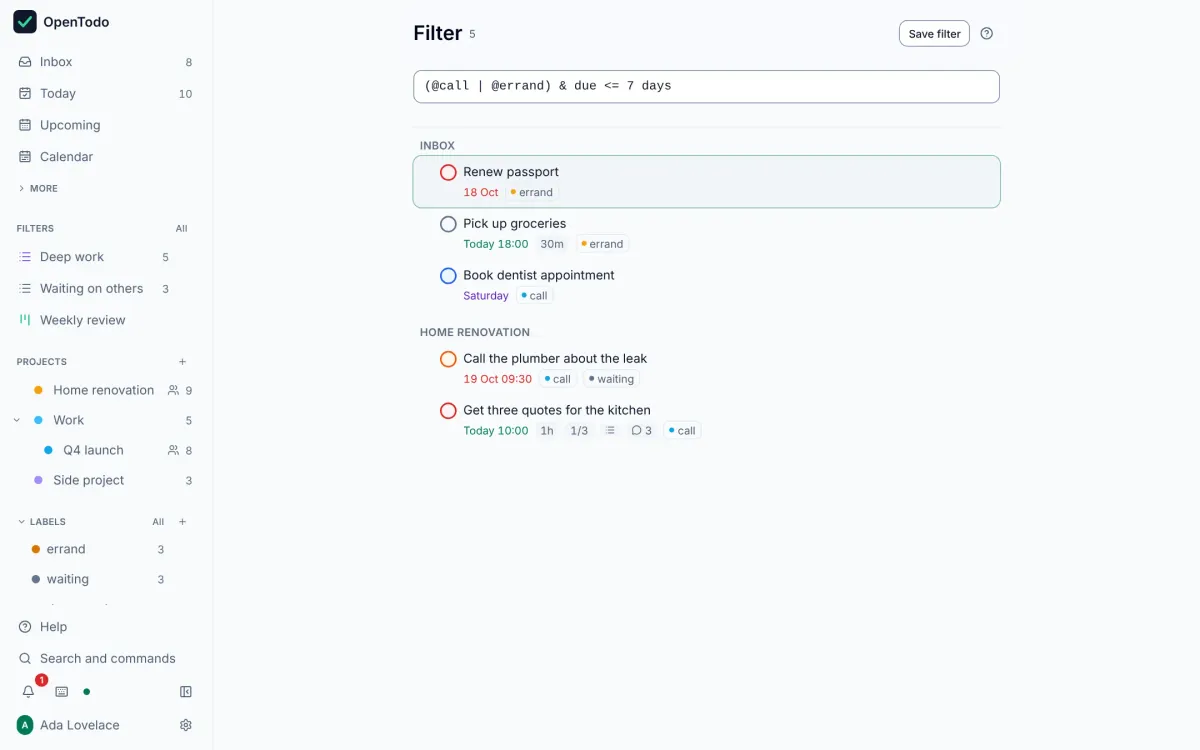
- Open Filter in the sidebar (g then f) and type a query. Results appear as you type, grouped by project. Find tasks with a filter
- Combine small pieces:
@call(has this label),#Work(in this project),p1,overdue,due <= 7 days,search: invoice. Join them with&(and),|(or) and!(not), and use brackets:(@call | @errand) & due <= 7 days. Find tasks with a filter - When the results are what you want, press s (or use the save button) and give the view a name. It appears under Views in the sidebar with a live count, and syncs to your other devices. Save a filter as a view
- From the top of the saved view, choose how to group it (by project, date, priority or label) and sort it. To change the query, press /, edit it and press Enter. Save your own views
Ideas
@waiting & open: everything you are waiting on. Pin it as “Waiting on others”. Tips#Work & p1 & due <= tomorrow: the most important work for today and tomorrow. Find tasks with a filter- Put up to six saved views side by side as a dashboard for a morning review. Build a dashboard
If it does not work
- A message under the box says where the query is wrong, and the previous results stay visible. Names with spaces go in quotes:
#"Client A". The full language, with ten worked examples, is in the filter queries reference.