
Product launch
A small team's launch plan on a board, from final checks to the announcement and the week after.
- Board
- For teams
- Teamwork
- Time management
About this template
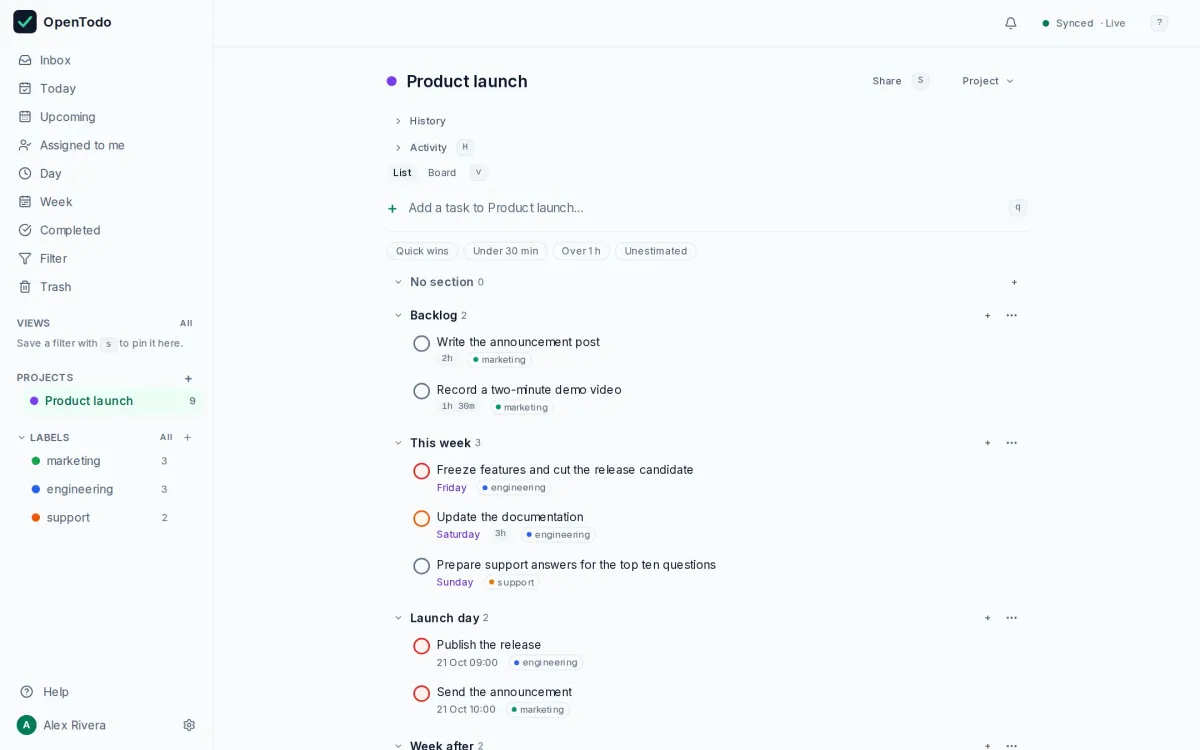
A launch needs everyone to see the same plan. Import this template, share the project with your team as editors, and show it as a board: Backlog, This week, Launch day, Week after.
Tasks carry estimates, so the Week calendar shows whether the plan fits into the days you have.
How to use it
- Import the file, share the project with your team as editors, and show it as a board.
- Assign the tasks and give each an estimate; the Week calendar then shows whether the plan fits the days you have.
- Move cards across Backlog, This week, Launch day and Week after as the launch approaches.
Make it yours
- Rename the sections to your own stages, or add a "Blocked" column.
- Save a view `#Launch & due <= 7 days` for the stand-up.
- Add a label per workstream (`@marketing`, `@engineering`) and filter the board by it.
Import it in three steps
- Download the template file.
- In OpenTodo, open Settings, then Data, then Import data.
- Choose the file, check the preview, and select Import.
What is inside
Every project, section and task the file creates, as the import will show them. Dates are relative to the day you import.
- Product launchBacklog
- Write the announcement post
- Record a two-minute demo video
This week- Freeze features and cut the release candidate
- Update the documentation
- Prepare support answers for the top ten questions
Launch day- Publish the release
- Send the announcement
Week after- Collect feedback and file follow-ups
- Write a short retrospective
Similar templates
First 90 days in a new job
A plan for your first three months, split into learn, contribute and lead.
- List
- For professionals
Household chores
Daily, weekly and monthly chores on repeat, ready to share and assign in a household.
- List
- For households
Meal planning
A weekly rhythm for choosing meals, writing the shopping list and prepping ahead.
- List
- For households
Your to-do list, on your own server.
Try the demo in your browser. When you like it, install OpenTodo on your server and import your tasks.