
Open Loops
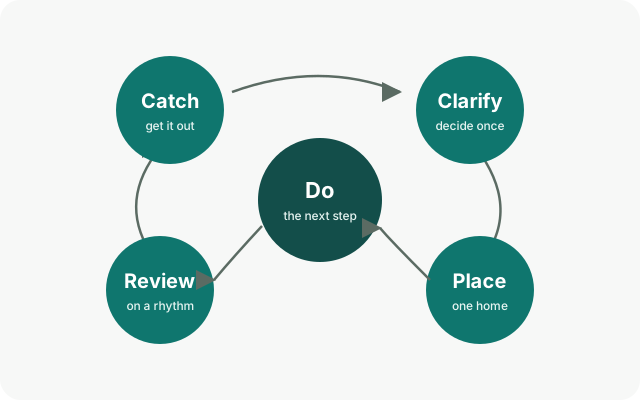
An open loop is anything that has your attention and has not been dealt with: a call to return, an idea for the garden, the tax form on the desk. Kept in your head, open loops nag. Open Loops is a calm method for closing them: everything that has your attention gets a home you trust, so your head is free for the work in front of you.
On this page
It is OpenTodo's own method, inspired by David Allen's GTD and simplified. You can use as much of it as you like: the app works the same without it.
The five moves#
- Catch: get whatever is on your mind into the Inbox the moment it appears.
- Clarify: decide once what each item is and what it needs.
- Place: give every item one home: a project, a date, Waiting or Someday.
- Do: work from your next actions, by context, one step at a time.
- Review: look over the whole system on a rhythm, so you can trust it.
Seven principles#
- Catch everything. If it is on your mind, it goes in the Inbox.
- Decide once. Each item gets one decision, the first time you look at it.
- Do it if it is quicker than filing it. A task of a minute or two is done on the spot, not filed.
- One next step. Every project always shows its very next action.
- Hide what is not now. Deferred, waiting and someday items stay out of sight until they matter.
- Review on a rhythm. A system works only while you trust it, and you trust it by reviewing it.
- Your loops, your server. Everything stays on your devices and your own server, private by design.
The rest of the method#
- Places: the seven homes a task can have, and the screen for each.
- Rhythms: the Daily check, the weekly review and the Monthly look.
- Horizons: next steps, projects and areas.
- Set up in ten minutes: turn the method on and start.
- Coming from GTD: the words you know, and where they live here.
How prominent it is#

The Loop home (g Shift+L, and the start view in Open Loops first) is the method on one screen: a capture field at the top, then the five moves in order, each with its count and a link to its screen. One move is lit, the first in the loop that needs you, and it carries the page's only button: Clarify while the Inbox has items, then Place while a project has no next action, then Review while a rhythm is due, then Do. When the Inbox is empty, every project has a next action and nothing is due, the page says the loop is closed. Below the moves are today's focus with how many of the chosen tasks are done, and the Loop pulse: tasks done this week against last week, how many of the items caught in the last fourteen days have left the Inbox, the age of the oldest Inbox item, and completions per day. The pulse uses the same definitions as Statistics, is computed on your device and sends nothing anywhere.
In Settings → You → How you work you choose how much the app shows the method: Lists only (no method words at all), Companion (screens name the move they serve and link here) or Open Loops first (the Loop home opens first and the sidebar is arranged by the Places). See Set up in ten minutes.